.png)

Designing a UX Audit Platform: AuditFlow
A SaaS platform that helps UX professionals organize findings, prioritize recommendations, collaborate with clients, and generate professional audit reports.
Focus: Product strategy • UX/UI design • SaaS development • Client collaboration
Purpose
AuditFlow was created to give UX professionals one centralized place to document findings, organize evidence, prioritize recommendations, collaborate with clients, and generate polished audit reports.
Scope
-
Project and audit management
-
Structured UX findings
-
Evidence and screenshot uploads
-
Severity, impact, and effort ratings
-
Client collaboration portal
-
Report customization and PDF exports
-
Subscription and billing experience
My Role
Founder and Product Designer
I led the product strategy, user experience, interface design, usability testing, feature prioritization, development coordination, quality assurance, and launch preparation.
The Problem
UX audits are often managed across disconnected tools
UX professionals frequently rely on spreadsheets, presentation decks, documents, screenshot folders, and project management tools to complete a single audit.
This creates several problems:
-
Findings become difficult to organize and update.
-
Evidence is separated from recommendations.
-
Reports take significant time to format.
-
Clients have limited visibility into progress.
-
Repeated administrative work reduces time available for analysis.
Design challenge
How might we create a structured audit workflow that saves UX professionals time without limiting the flexibility of their process?
Product Goals
1. Centralize the audit process
Bring projects, findings, evidence, recommendations, and reports into one workspace.
2. Reduce repetitive work
Allow users to reuse structured data throughout the audit instead of reformatting it for every deliverable.
3. Improve client collaboration
Give clients a dedicated portal where they can review progress, respond to findings, and access reports.
Main Issues
Before
After

User Journey

Designing the AuditFlow Experience
Project Dashboard
The dashboard gives UX professionals a clear view of active projects, progress, client access, findings, and recent activity.
Design goal: Make it easy to understand the status of every audit without opening multiple files or tools.

Structured Findings
Each finding includes:
-
Title and description
-
Severity
-
User impact
-
Implementation effort
-
Recommendation
-
Supporting evidence
-
Status and category
Design goal: Create enough structure to keep audits consistent without forcing every consultant into an identical process.


Report builder
Users can select findings, organize sections, customize report content, and generate a professional client-facing PDF.
Design goal: Reduce the time spent rebuilding information that has already been documented during the audit.


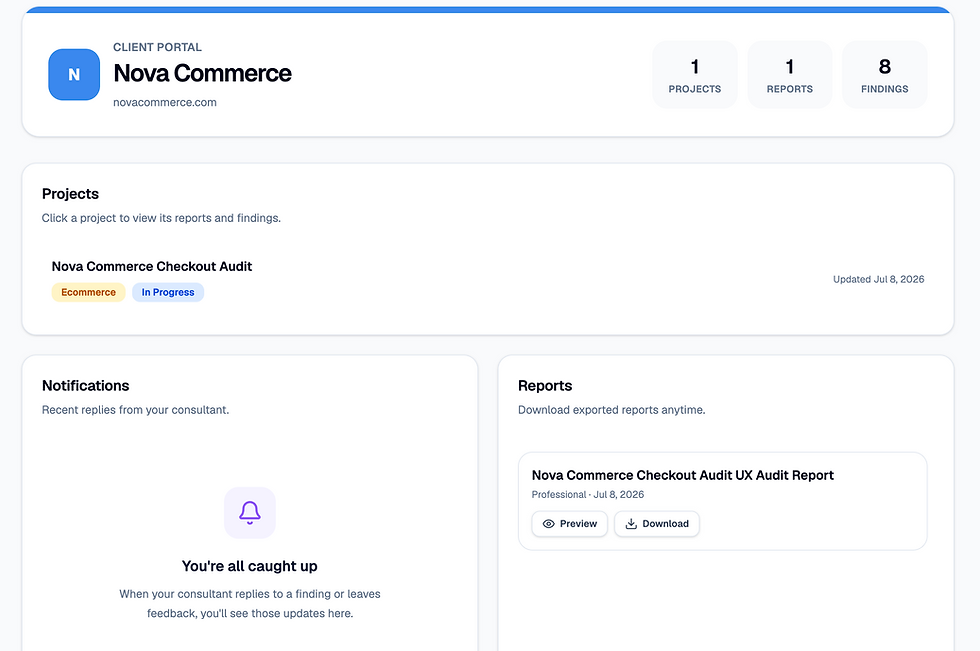
Client Portal
Clients can review findings, access reports, receive updates, and participate in the audit without entering the consultant’s internal workspace.
Design goal: Give clients transparency while maintaining a clear separation between internal and external information.


Recommendations
The Recommendations workspace helps consultants translate usability findings into clear, actionable improvements. Each recommendation is linked to supporting evidence and prioritized to help clients understand what should be addressed first.
Design goal: Make recommendations easy to create, organize, and communicate while keeping them directly connected to the findings they address.


Analytics
The Analytics dashboard provides a high-level view of audit data, helping consultants identify trends, track project progress, and understand where the most significant usability issues exist.
Design goal: Surface meaningful insights through visual reporting, allowing consultants to quickly identify patterns and support data-driven decision making.

Key Design Decisions
Structured but flexible
AuditFlow uses consistent fields for findings while allowing users to customize categories, recommendations, evidence, and report content.
Progressive complexity
Advanced features appear when they become relevant, helping new users begin without being overwhelmed by the full product.
Separate consultant and client experiences
The primary workspace supports detailed audit management, while the client portal presents a simpler, more focused experience.
AuditFlow began with a problem I had repeatedly encountered in UX work: the audit itself was valuable, but the process of organizing findings and creating the final deliverable was fragmented and time-consuming.
Designing AuditFlow required more than creating an interface. I had to define the product strategy, translate an unstructured professional workflow into a flexible system, design for both consultants and clients, and make decisions across onboarding, billing, reporting, collaboration, and responsive behavior.
The result is a focused SaaS platform that helps UX professionals spend less time managing audit documentation and more time identifying meaningful improvements.
AuditFlow is now a live product and continues to evolve through user feedback, behavioral analytics, and hands-on testing. View here: www.auditflowapp.co